|
|
||||
|
Setting MIDI connections in the app TouchDAW has a number of options to make MIDI connections. By default it uses RTP over a WiFi connection and you may want to read the quickstart guide to get that set up before you change anything in the app. 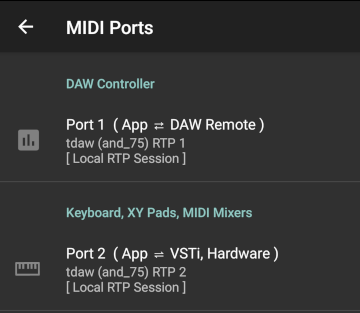
MIDI connections are configured at Setup / MIDI Ports. The app uses two separate connections for its two major parts. These are completely independent of each other and each has its own preference in the setup.
Touch a preference and a configuration dialog will launch presenting available MIDI connections grouped by their basic transport characteristics: 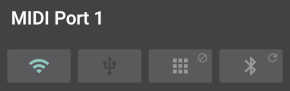 The 4 tabs then contain listings of all available MIDI devices that match those groups. If a previously selected device is not present the dialog will say so and the app will temporarily revert to its default WiFi settings without changing your preferences. Tabs with an additional small icon have a long-click option. What these do is explained on the respective transport's manual page. Note that MIDI connections will only actually be made or changed after you 'OK' the dialog and back out of the app's setup. MIDI Options
Some less frequently needed preferences are accessible on the 'MIDI Options' subpage:
MIDI Relay When activated TouchDAW will send MIDI it receives on Port 1 out to Port 2 and vice versa. This can for example be used to make USB MIDI hardware operate wirelessly. Note that this option is rather a byproduct of the 'two MIDI connection concept' and not a 'promoted feature' or the purpose of this app. For a dedicated MIDI Relay without the overhead of a DAW Controller look at MIDI Connector. MIDI that you generate by touching controls in the app will be merged into the relayed data streams.
BLE Peripheral Mode Opt-In for the experimental 'virtual BLE device' functionality. Needs to be explicitly activated, because I really want you to read the corresponding manual page and understand the implications. |
||||
|
|
||||